
Practical AI for safety
One platform for safety — now with AI capabilities
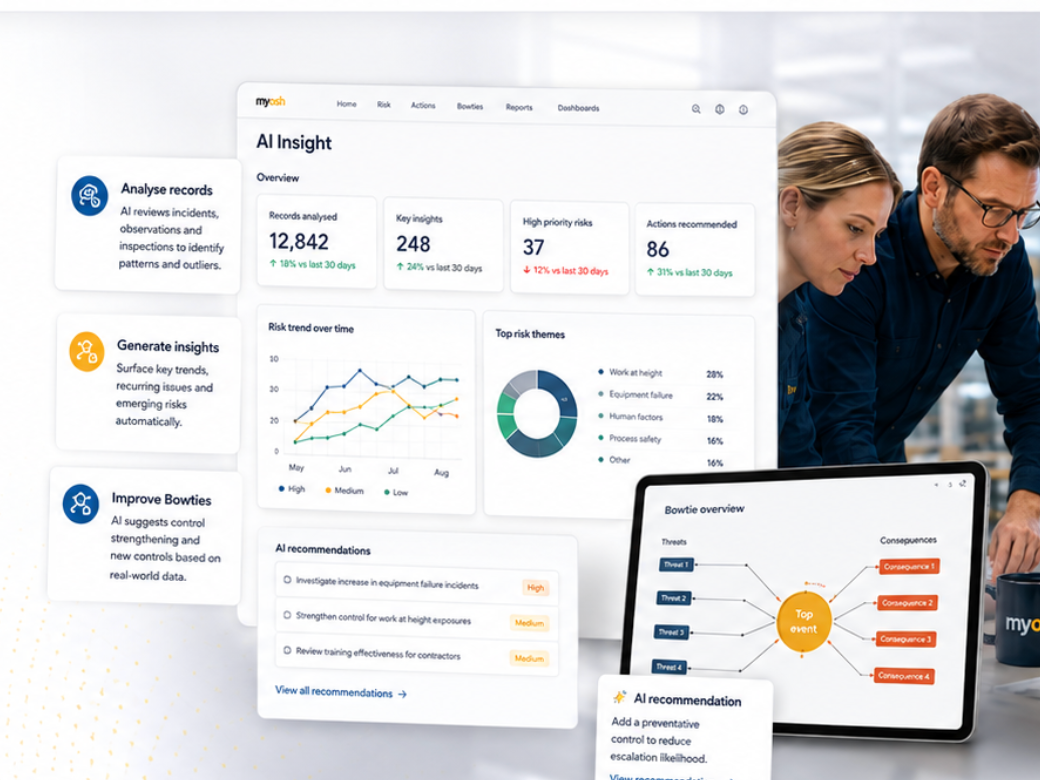
myosh AI is built into records, forms, dashboards, and Bowties, so you can review information faster and make better-informed decisions.
Analyse & insights
AI reviews incidents, observations and inspections to surface patterns, recurring issues and emerging risks.
In-form AI Actions
AI Buttons that do custom actions for you to let you blaze through your forms
Improve Bowties
AI suggests control strengthening and new controls based on real-world data.
Build forms
Create smart forms faster with AI assistance.
Not a chatbot on the side
AI inside the work you already do
myosh embeds AI in records, lists, forms, and Bowties. It follows your business rules, permissions, and audit trail. For the detailed capability list, see AI Features Overview.
See it
Two minutes in the product
Short product recordings. These are the capabilities as they run in myosh today.
AI Field Data Generation
AI Form Creator
In the platform
Six ways teams actually use it
Each capability sits in an existing workflow. None of them replace your process. They speed up review, drafting, and analysis inside it.
01 — Record
Summarise any open record
The test-beaker tool reads the record in front of you, including attached PDFs, and returns an immediate summary and quality check. Built for reviews, not for rewriting the source of truth.
02 — List
Find weak signals across a list
From a filtered list view, analyse many records at once. Ask for trends, outliers, or a specific extraction. You bring the question. The list is the scope.
03 — Forms
Put AI on the form, on purpose
Administrators add context-aware AI buttons to forms: extract structured data from images or PDFs, turn selected fields into text, or guide a SWMS, investigation questions, or Energy-Based Safety steps.
04 — Builder
Draft a form in seconds
Describe it in plain language, or drop a PDF or PNG/JPG. AI Form Creator builds the operational form, then inherits your existing workflow templates: approvals, permissions, notifications, and reporting.
05 — Bowtie
Generate and critique Bowties
An industry-first, AI-assisted Bowtie modeller, tied into Critical Control Management. Generate the diagram, stress-test it, then create records and verify controls in one click.
06 — Visual
Read the picture, not just the fields
Visual Risk Intelligence looks at supported images and documents in the workflow to flag high-energy hazards, Energy-Based Safety exposures, and likely control gaps, and to suggest documentation updates.
Enterprise control
Your rules stay in charge
Enterprise AI needs enterprise governance. Administrators configure behaviour in the Viking 2.0 Form Editor. AI output is a recommendation until someone reviews and approves it through the process you already trust.
Bring your own key
Use myosh-managed credentials, or bring your own enterprise API keys. Google Vertex, OpenAI, Anthropic, Bedrock, and similar providers, so procurement, privacy, and data sovereignty stay aligned.
Configure each capability
Provider, model, reasoning profile, optional web search, and custom prompts are set independently per capability. Throttle how much “thinking” you allow.
Form-level system prompts
Give every AI interaction on a form the same persona and base instructions, so a SWMS form and an investigation form do not behave as if they were the same job.
Attachments, on a leash
Centrally choose which attachments AI may consider. The workflow engine still executes your business logic. Humans stay in the loop.
On the roadmap
Where this is heading
The longer bet is an Enterprise AI Configuration Platform: AI as an interface to processes you already govern. The items below are planned, not current product.
Near-term
MCP connectivity
Model Context Protocol servers so MCP-compatible AI applications can reach myosh with your existing permissions. Cross-system analysis and natural-language access to safety information, without a side door around access control.
Medium-term
Governed interaction
Authorised AI applications create or update records, populate forms, and start processes. Still inside myosh permission models. Still a governed write, not a free-form agent.
Long-term
Predictive risk
Machine learning on myosh’s 20+ years of enterprise safety data, aimed at forecasting incident likelihood and recommending controls. Research direction, not a live model on this page.
Next step
See it against your workflows
If you already run myosh, this is configuration in Viking 2.0. If you do not, we will show the same capabilities in a demo, on your processes, not a generic slideshow.